 Seppukuman (Japanese Hangman) for Android
Summary
Seppukuman allows enriching your Japanese vocabulary with playing on an android phone.
It consists to click on a Hiragana/Katakana (Japanese characters) panel to guess randomly generated words.
It looks like Hangman in English but this uses a traditional Japanese Samurai’s execution method i.e. Seppuku (Harakiri).
This version displays 3 different translation (English, German or French)
according to your phone's default setting.
How to use it?
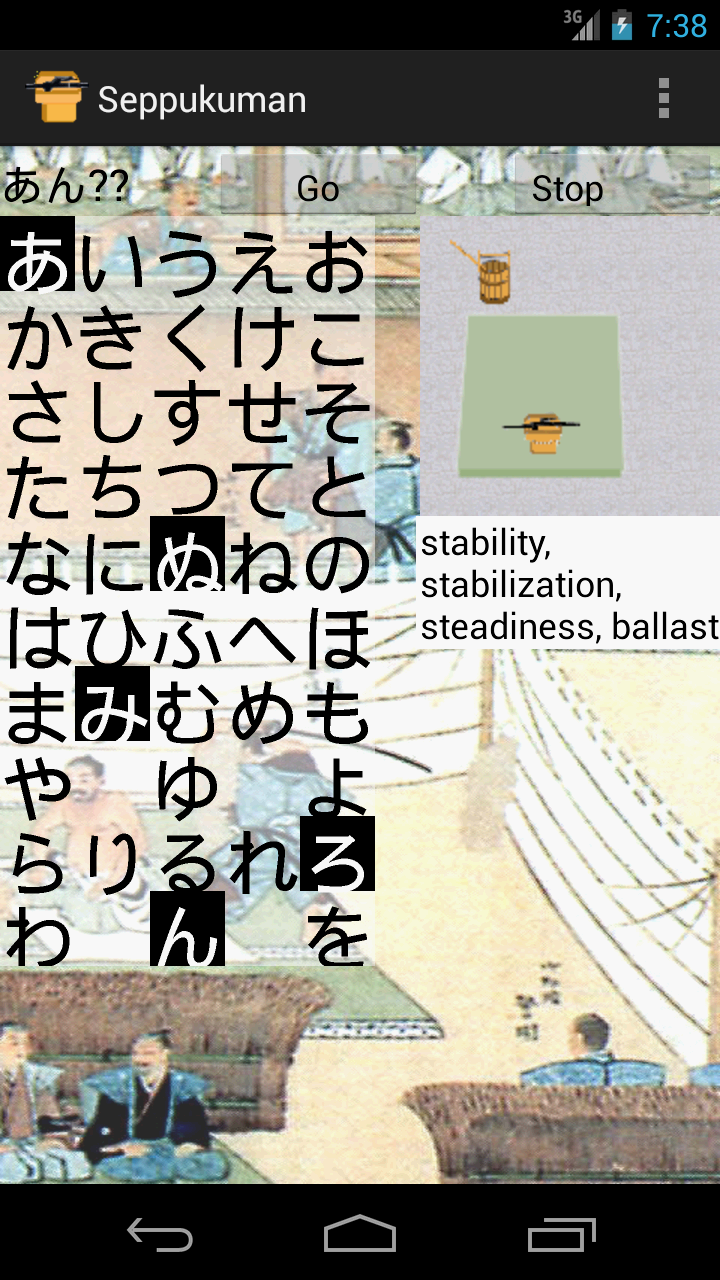
Push on a button at top and the program will generate randomly a hidden word from its dictionary.
You have to guess it by touching Hiragana characters (Japanese phonetic characters) from the left panel
with an aid of its translation at right. When you guessed the correct word or failed
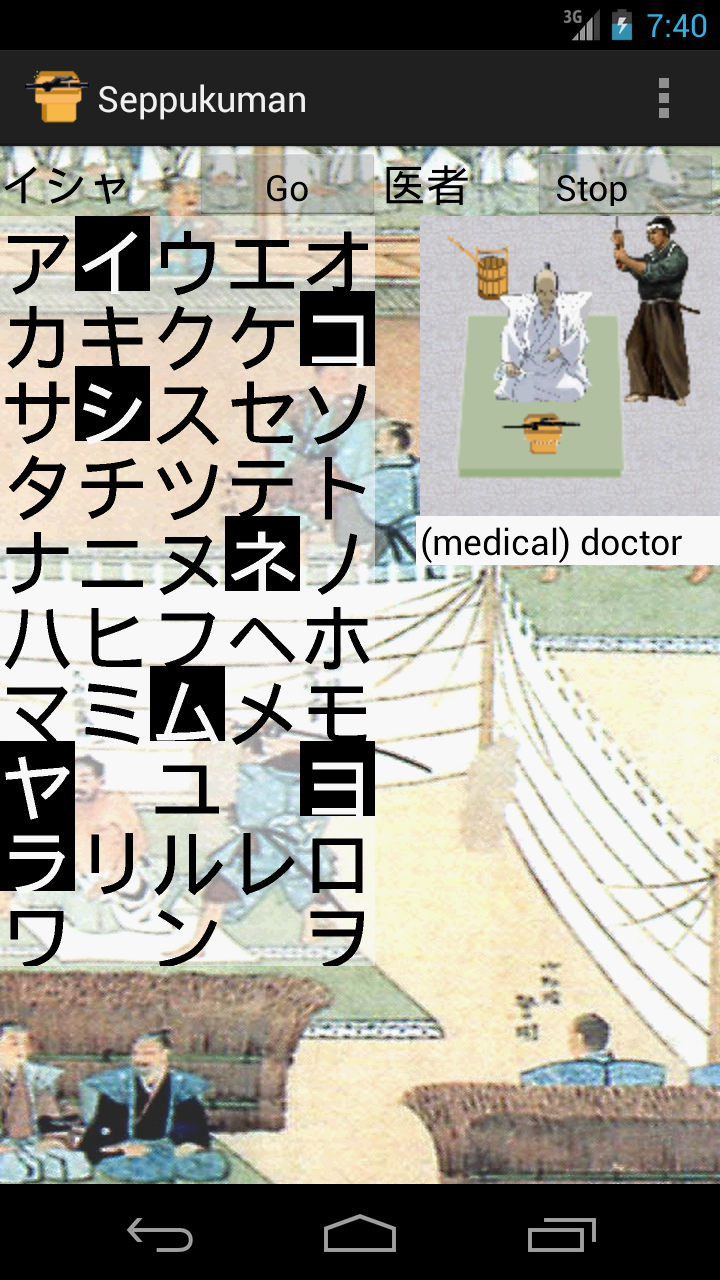
by touching more than 5 times wrong characters, the game is over and you will see the correct answer at top-left
and its counterpart in Kanji (Chinese characters) at top-right.
Initialization
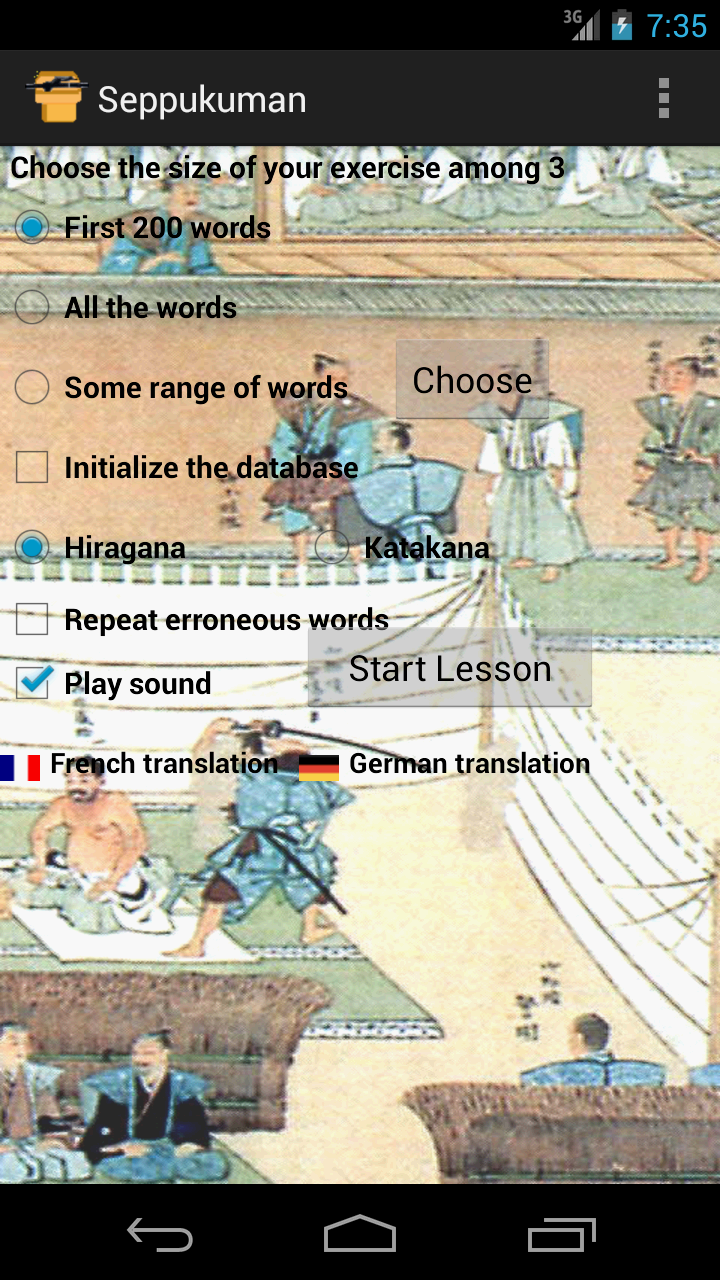
You can choose the size of exercise among 3 alternatives (first 200 words, all the words or a range of words chosen from a dialog box).
More you want words, more time is needed for a database initialization.
Once the database initialized, subsequent launches should go much faster,
for you need no more internet connection unless you may want to add more words.
When "Repeat errors" button is unchecked, the program creates a list of wrongly answered questions from those exercises,
while by checking it, the program limits questions only from this list and every good answer will be removed from it.
You can also choose the character set you want to learn (Hiragana or Katakana) and the presence/absence of sound.
Minimum Configuration
Android version: 2.2 or later
Screen size: 480x800 pixels or larger
FAQ
When the Internet access is necessary?
Once during a database initialization.
How to change the translation language?
By changing the default setting of your phone or purchasing "Seppukuman Gold". Concretely, go to
Home/Settings/Local & text/Select locale, then choose between English, French or German.
If you have purchased it, those cumbersome operations are not necessary.
Where I can find it?
Connecting to Android Market from a browser
or launching Android Market Apps with your android phone and search the program by typing keyword "Seppukuman".
Have a fun!
Other Japanese language resource
 Our Euro-Japan Dictionary for Android is also available free.
Release Notes
Version 1.11 released on June 10, 2010
This version should avoid untimely database initialization of 1.1 when the phone's orientation is changed.
Now, Hiragana/Katakana characters become a bit larger so it should avoid unintentional touches.
This version also offers a way of giving up the ongoing question by pushing "Stop" button.
Version 1.12 released on June 15, 2010
This version can display 3 different translations (English, German or French)
according to your phone's default setting. Other language users should see English translation.
Version 1.13 released on June 24, 2010
Version 1.13 has been replaced by 1.14 because it couldn't switch to French nor German translations with Android version 1.6 and beyond.
Version 1.14 released on June 24, 2010
This version displays the last touched symbol and its pronunciation in Roman characters (Romaji).
The program uses now more compact images so the package size has been halved.
Version 1.15 released on July 3, 2010
This version corrects some bugs related to a database initialization.
More messages have been added for the users who play without sounds.
Version 1.16 released on July 24, 2010
This version shows a progress bar during a database initialization.
Version 1.17 released on August 3, 2010
This version shows a cancel button on the progress bar.
Version 1.20 released on August 26, 2010
This version saves all the wrongly answered questions,
so you could repeat them by clicking "Repeat errors" button.
Version 1.21 released on October 19, 2010
This version should allow updating easily the dictionary from the menu "Reset Database".
By the way, a new database has been also uploaded so it is recommended to update it on your phone.
Version 1.30 released on November 1st, 2010
This version downloads directly a dictionary database from our server instead of forming it from a downloaded cvs file
so the initialization time is much shorter. By the way, you have always a full database on your phone so the initialization time
is virtually the same whatever the size of exercise you may choose.
Version 1.40 released on November 15, 2010
This version should allow changing freely the translation language among three (English, French and German),
if you have already purchased "Seppukuman Gold" from Android Market. Otherwise only one language should be activated.
Version 1.41 released on March 29, 2011
This version allows choosing a different server if the first one is jammed during a database initialization.
Though the program generates randomly questions, the same question should never appear consecutively.
Version 1.42 released on June 2, 2011
The last version allows purchasing “Seppukuman Gold” from Android Market without leaving the program,
so you could easily transform the free version to a multilingual one. By the way,
Japanese words used without translation such as locality names have been removed from the question list, because too easy.
Version 1.50 released on November 22, 2012
The last version allows choosing the words which begin with a some range of characters with a dialogue box.
It also displays the translation with a white background to be more readable.
Version 1.60 released on May 31, 2014
This is a major update because now you can use this app on recent mobile phones with a large screen and/or without hard menu button (tap 3 dots instead). It pronounces also each Hiragana/Katakana syllable when you tap it.
You may also need to download a new version of the database by initializing it, if it is about an upgrade.
Last update: November 24, 2017
E-mail: admin@docoja.com
Copyright Free Light Software,
Our Privacy policy